Installing Equinox OS
Equinox installs from inside itself: you boot the ISO, run the installer, and the OS formats a disk, copies its own layout onto it and compiles the userland there with the in-OS compiler. Two paths:
- Path A —
equinoxinstall(recommended): a 4-phase interactive wizard. One command, few prompts, bootable result. - Path B — manual: individual commands (
Qfs,mount,copy,set,Qfs -install-boot) for scripted or surgical installs.
Either way, afterwards the target disk boots without the CD.
What ships and what does not: the base system carries the kernel, shell, mtcc + tool/libc sources, the EquiX desktop and the Qfs / eggkg machinery. The classic coreutils (
ls cat cp mv rm mkdir rmdir
rm touch stat
and friends) are not bundled — they are installed as thebashpackage viaeggkgright after the first boot (see PACKAGES.md). Until then the shell's builtins and aliases cover basic navigation.
Path A — the equinoxinstall wizard
Run it from the shell:
root::users / $ equinoxinstall
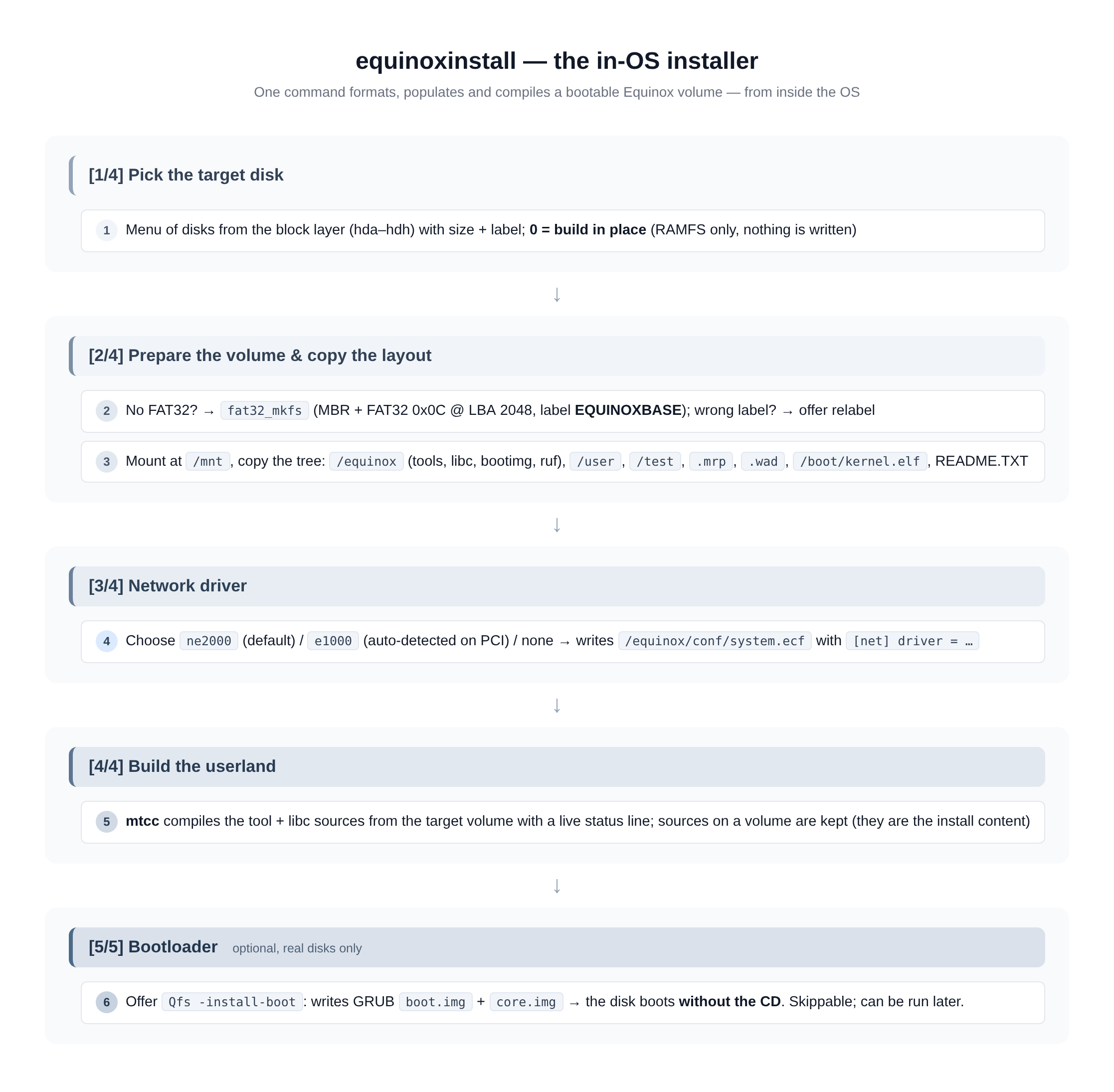
[1/4] Pick the target disk
The wizard lists every disk the block layer knows (hda–hdh, with size and label — this spans both PATA and SATA/AHCI disks, see DRIVERS.md):
[1/4] pilih disk target
   0)  build in place (tanpa install ke disk)
   1)  hda  64.0 MB  ...
  target [0]:
0or plain Enter → build in place: compile into RAMFS, skip all disk work. Perfect for a quick first try (make run).- A disk number → continue to phase 2.
[2/4] Prepare the volume + copy the layout
- No FAT32 partition on the disk → the wizard offers to format:
fat32_mkfswrites a fresh MBR with a whole-disk FAT32 partition (type0x0Cat LBA 2048) labelled EQUINOXBASE. ⚠️ Formatting destroys everything on the disk. - A FAT32 partition with a different label → offer to relabel it to
EQUINOXBASE(required for the volume to be promoted to/on boot). - The volume is mounted at
/mnt, then the layout is copied onto it:/equinox(tools, libc, bootimg, ruf recipes),/user,/test,.mrpprograms,.wadfiles,/boot/kernel.elf,README.TXT.
[3/4] Network driver
Pick the NIC the installed system should use at boot:
   1) ne2000   NE2000 ISA 0x300 IRQ9 — default
   2) e1000    Intel PRO/1000 PCI — DETECTED on the PCI bus
   3) no networking
The choice is written to /equinox/conf/system.ecf on the target:
# konfigurasi sistem — ditulis oleh equinoxinstall
[net]
driver = e1000
At the next boot net_nic_init() reads it (see
CONFIGURATION.md). If you pick e1000 without the
card being present the boot falls back to the NE2000.
[4/4] Build the userland
mtcc compiles the tool + libc sources from the target volume with
a live status line. On a volume the sources are kept — they are the
install content and allow later rebuilds with equinoxinstall -compile.
RAMFS-only builds remove the sources after a successful compile (that
content comes back with the next ISO boot anyway).
[5/5] Bootloader (optional)
For a real disk target the wizard offers:
[5/5] pasang bootloader GRUB ke hda (boot tanpa CD)? [y/N]
Answering y runs Qfs -install-boot, which writes GRUB boot.img +
core.img (staged in RAMFS at /equinox/bootimg/) onto the disk. Skip
it now if you like — it can be run at any time later.
Reboot into the install
root::users / $ reboot
Remove the ISO (or let -boot order=d still prefer the CD); the disk
now boots GRUB → Equinox with its userland already compiled and
persistent.
Wizard shortcuts (no disk work)
| Command | What it does |
|---|---|
equinoxinstall |
Full wizard (phases 1–4 + optional 5) |
equinoxinstall -compile <dir> |
Only phase [4/4]: compile userland from <dir> (expects <dir>/libc + <dir>/tools) |
equinoxinstall -build <file.ruf> |
Build one ruf v3 recipe via mtcc -make |
equinoxinstall -build <name> |
Build a single tool from /equinox/tools (mtcc -c) |
equinoxinstall -build *.ruf |
Build every matching recipe (single-star glob) |
Path B — manual install
Every wizard step is also a standalone command; this is the route for scripts and for people who want control.
# 1. See what is attached (PATA slots 0-3 -> hda..hdd, SATA/AHCI -> hde..)
Qfs -list-disk

# 2. Format the target (DESTROYS its contents) as FAT32 label EQUINOXBASE
Qfs -t hde -format fat32

# 3. Mount it and copy the layout with the copy builtin
#    (glob, directories auto-created, recursive-copy guard)
mount hde
copy /equinox        -> /mnt/equinox
copy /user           -> /mnt/user
copy /test           -> /mnt/test
copy /boot/kernel.elf -> /mnt/boot/kernel.elf

# 4. Write the boot configuration (INI-lite .ecf, see CONFIGURATION.md)
save /mnt/equinox/conf/system.ecf << "# config"
[net]
driver = ne2000

# 5. Install the GRUB bootloader so the disk boots without the CD
Qfs -install-boot hde

# 6. Build the userland in place (sources were copied with the layout)
equinoxinstall -compile /mnt/equinox

# 7. Optional: pivot the base directory, applied at next boot
set -b /mnt/equinox

umount hde
reboot
Notes:
copy SRC -> DST(the->is optional) copies files and trees; the destination directory is created automatically.set -d FILE [-path DIR] [-base SRC]registers an.ecfas the system config;set -b PATHrecords the base pivot; both are persisted throughsystem.ecf(see CONFIGURATION.md).Qfs -install-boot hdXneeds/equinox/bootimg/{boot.img,core.img}in RAMFS — the ISO ships them (make bootimg).
After the first boot of an install
# the coreutils are still not bundled — fetch them:
eggkg update && eggkg install bash -y

# and verify the system picked up its config:
set list            # active .ecf contents
ifconfig            # driver per system.ecf + DHCP lease
info                # version, RAM, uptime
Sizing the install
| Media | Minimum | Comfortable |
|---|---|---|
Guest RAM (QEMU -m) |
64 MB | 256 MB |
| Target volume | ~32 MB | 64 MB+ (room for packages, DOOM WAD, downloads) |
The FAT32 write path is write-through per close, so there is no
"eject" semantics beyond umount — but prefer a clean umount before
killing QEMU after writes.